SingLinkVPN May 2026 Milestones: 2.0 All Platforms, Free Plan Open, Hong Kong App Store Utilities Top 44, 2.93M X Impressions in 7 Days
Contents
April–May 2026 has been a "dense liftoff" period for SingLink: the consumer client moved from 1.x to the SingLinkVPN 2.0 architecture, our in-house Beta servers tested at 99.5% connectivity, the 200 MB-per-day free plan opened to everyone, our iOS app climbed into the Top 44 of the Hong Kong App Store Utilities (Free) chart, and our official X account @SingLinkVPN crossed 2.93 million impressions in 7 days.
Here is everything that happened, in one post.
1. SingLink 2.0 client shipped on every platform
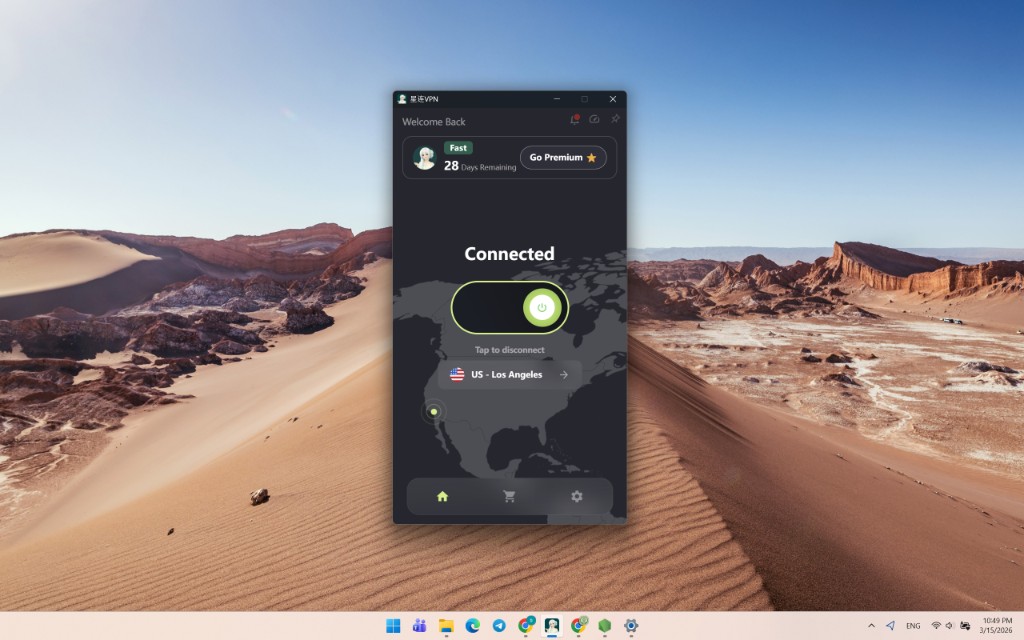
SingLink 2.0 isn't a routine point release — it's a full-stack rebuild from the protocol kernel up to the UI. The releases landed on every platform within a tight April–May window:
| Platform | Latest version | Key changes |
|---|---|---|
| macOS | 2.0.9 (2026-05-07) | Across-the-board speed tuning, community-reported issues fixed; released for both Apple Silicon and Intel |
| Windows | 2.0.9 (2026-05-07) | Across-the-board speed tuning, community-reported issues fixed |
| Android | 2.1.3 (2026-05-03) | Across-the-board speed tuning, community-reported issues fixed |
| Android | 2.0.8 (2026-05-01) | Free plan system officially live on Android, free servers added, custom (disguised) app icons |
| macOS | 2.0.8 (2026-04-29) | Free plan system improvements, new free servers, Mac crash fix, hidden-proxy launch fix |
| Windows | 2.0.8 (2026-04-29) | Free plan system improvements, new free servers, speed tuning |
| iOS | 2.0.6 (2026-04-28) | Free plan system improvements, new free servers |
| iOS | 2.0.5 (2026-04-02) | Officially listed on the App Store, free-plan servers added, alternate icons |
| iOS | 2.0.2 (2026-04-04) | New SingLink 2.0 protocol kernel, native iOS UI, smart routing, server speed test |
Note: the App Store shows iOS version numbers as 1.0.x. They map directly to SingLink internal 2.0.x — SingLink uses its own versioning scheme.
Headline 2.0 improvements:
- Protocol kernel 2.0 — A new in-house SingLink 2.0 protocol: faster connections, more resilient obfuscation
- Native UI rebuild — iOS / Android / macOS / Windows now follow each platform's native design language
- Smart routing + server speed test — Domestic vs overseas auto-detection, real-time per-server latency
- Fast mode / Secure mode toggle — One tap to flip between speed-first and security-first profiles
- Kill Switch + biometric unlock — Auto-disconnect on VPN drop, fingerprint / Face ID unlock
Full release notes: Changelog.
2. Beta servers: SingLink in-house protocol at 99.5% connectivity
We mark SingLink in-house protocol servers with a "Beta" tag, distinct from the legacy "non-Beta servers" running open-source protocols (VLESS / Hysteria / Trojan).
Here are the latest A/B numbers:
| Server type | Protocol | Connectivity |
|---|---|---|
| Beta servers | SingLink in-house protocol | 99.5% |
| Non-Beta servers | VLESS / Hysteria / Trojan and other open-source protocols | 78% |
After April's "disconnection wave", most VPNs are running on a single protocol mode, and most of those are based on these few open-source protocols. SingLink Beta is the in-house upgrade we built specifically for this round of detection — the core idea is traffic disguise.
Bottom line: SingLink users — prefer servers tagged "Beta". The experience gap is real.
Full test report: Beta server 99.5% connectivity test details
3. Free plan now open to everyone: 200 MB daily, auto-reset at 00:00
To carry users through the May Day window of VPN shutdowns, the SingLink Free Plan is now open to everyone:
| Benefit | Details |
|---|---|
| 200 MB free per day | Available to every signed-up user |
| Auto-reset at 00:00 | Used it up? Your 200 MB refreshes automatically every day |
| Free-tagged servers | "Free" servers appear right inside the in-app server list |
| Phone & computer support | Available on iOS / Android / Windows / macOS |
| One device, one account | Switching accounts on the same device still shares the 200 MB |
Who it's for:
- Emergency backup — Switch to a free server when your main service is down
- Light browsing — Reading, search, chat and social — 200 MB is enough for a casual day
- Students — Research, online courses, overseas learning platforms — at zero cost
- Try before you buy — Test SingLink first, then upgrade when it fits
Full details: Free Plan announcement.
4. The recent network challenge: April's "disconnection wave" and how we responded
In April 2026 a wave of VPN / private-server shutdowns hit, driven by an upgraded detection regime:
- Most consumer VPNs had been running on a single open-source protocol mode for years — once detected, entire fleets of servers went dark
- Some private servers had been cutting costs and stopped investing in new infrastructure; once running costs ticked up, they simply shut down
- Around May Day, users hit "can't connect", "drops" and "disconnects" en masse
Here is what we did about it:
- Protocol level — We compressed exposure to high-detection open-source servers and routed traffic through our in-house Beta servers at 99.5% connectivity
- Stability level — We pulled the legacy non-Beta servers offline for upgrade and maintenance, on track to finish by Monday; other servers are unaffected
- Cost level — We opened all Beta servers as free at 200 MB / device / day. Pure goodwill — so nobody loses connectivity over May Day
- Brand level — Concentrated communication on X / Telegram / Hong Kong Earth Weekly, publishing real test data and not setting expectations beyond what we can ship
Our reasoning is simple: users only care whether they can connect right now — so that's the thing we make sure works.
5. Hong Kong App Store Utilities: SingLink hits Top 44 (Free)
In May 2026, SingLinkVPN (SingLinkVPN — AI Fast VPN) landed at #44 on Hong Kong App Store's "Top Downloaded · Utilities · Free Apps" — alongside the daily-driver apps Hong Kong actually opens: Nextin, Hong Kong Police Mobile App, China Unicom, Keeta Rider:
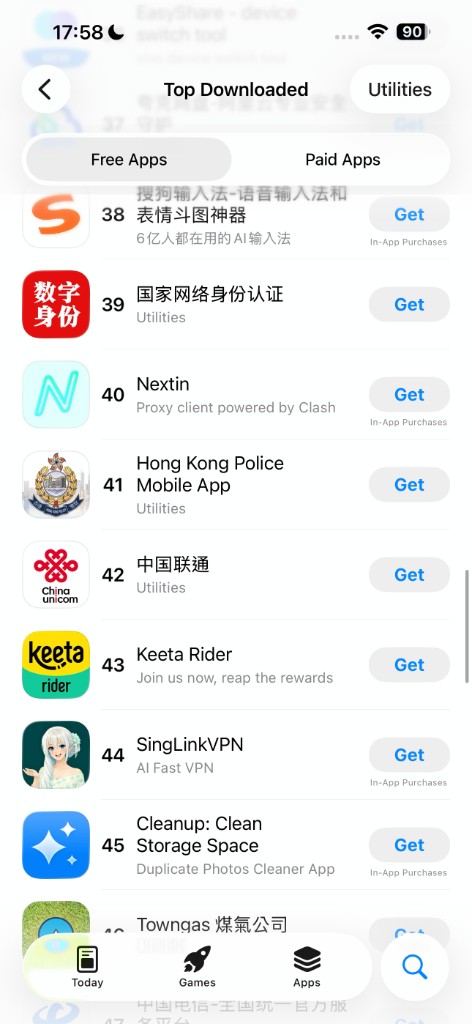
| Rank | App | Category |
|---|---|---|
| 40 | Nextin | Proxy client powered by Clash |
| 41 | Hong Kong Police Mobile App | Utilities |
| 42 | China Unicom | Utilities |
| 43 | Keeta Rider | Local food delivery |
| 44 | SingLinkVPN | AI Fast VPN (SingLink) |
| 45 | Cleanup: Clean Storage Space | Utilities |
This is where SingLink landed just over a month after launching on the App Store. iOS 2.0.5 went live on 2026-04-02; by 2026-05-05 it had stabilized in the middle of Hong Kong's free Utilities chart.
Hong Kong users can search SingLinkVPN directly on the App Store, or use the App Store link.
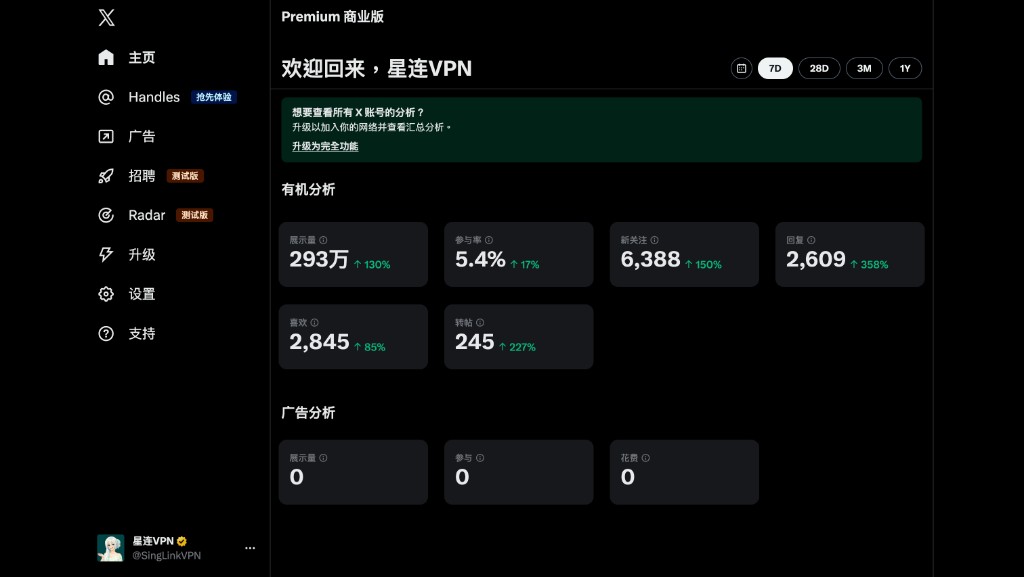
6. X analytics, last 7 days: 2.93M impressions, 6,388 new followers
The 7-day organic numbers from our official @SingLinkVPN account, late April through early May 2026:
| Metric | Value | 7-day change |
|---|---|---|
| Impressions | 2.93M | ↑ 130% |
| Engagement rate | 5.4% | ↑ 17% |
| New followers | 6,388 | ↑ 150% |
| Replies | 2,609 | ↑ 358% |
| Likes | 2,845 | ↑ 85% |
| Reposts | 245 | ↑ 227% |
X impressions cleared 2.93M in 7 days, follower count is up by 6,388, replies grew 358%, reposts 227% — meaning "SingLink isn't just being seen, it's being talked about and forwarded". All numbers come straight from X's organic analytics dashboard (zero ad spend — the ads tab reads 0 / 0 / 0).
We're putting brand weight on X / Telegram + Hong Kong Earth Weekly instead of paid distribution because:
- Real use → real talk — Nobody downloads a VPN because of an ad. They forward it because "it actually works"
- Transparent data — We publish test results, server status and version logs (Changelog)
- Built with the community — Telegram feedback ships into the next release (Join Telegram)
7. Get started in 30 seconds: download + pick a "Beta" server
Step 1 — Download the SingLink client
- iOS (Hong Kong / China / US and other regions): App Store download
- Android / Windows / macOS / Linux: All-platform download page
Step 2 — Sign up
Open SingLink and sign up with email or one-tap login. The free plan is included on signup — no credit card, no payment.
Step 3 — Pick a "Beta" server
In the server list, prefer servers tagged "Beta" (99.5% connectivity). When you need more, upgrade any time:
| Plan | Monthly | Devices | Data |
|---|---|---|---|
| Free | Free | 1 device | 200 MB / day |
| Fast | $3.59 | 4 devices | Unlimited |
| Plus | — | 6 devices | Unlimited |
| Pro | — | 10 devices + dedicated line | Unlimited |
Pricing details: Subscription plans | Free rewards hub.
8. FAQ
Q1: What's the core difference between SingLink 2.0 and 1.x? 2.0 is a full-platform rewrite from protocol kernel to UI, built around the in-house SingLink 2.0 protocol with native per-platform UI, smart routing and server speed test. Beta server connectivity is 99.5%. See SingLink 2.0 release.
Q2: Is the 200 MB free really uncapped (no card)? Yes — free on signup, no credit card, no payment. The 200 MB allowance auto-resets at 00:00 every day. See Free Plan.
Q3: Is "Beta" a test build? Should I worry about stability? No, it's not a test build. "Beta" is the tag for our in-house protocol servers. The latest measurements put them at 99.5% connectivity — currently the most stable tier we have. See Beta server test.
Q4: Can I download SingLink in Hong Kong / overseas? Yes. iOS is live on the App Store (Hong Kong, US and other regions). Android / Windows / macOS — head to the download page.
Q5: The App Store shows version 1.0.x on iOS — is that a different build? It's the same build. SingLink uses its own versioning scheme: App Store 1.0.x maps directly to internal 2.0.x. The full version number is visible inside the app.
9. What's next
This is just the start. The next priorities at SingLink:
- Beta server expansion — Roll the 99.5% connectivity tier out to more regions
- Free plan kept open — We plan to keep this line on permanently. Have it on your phone and on your computer — so May Day doesn't take you offline
- iOS / Android cadence — A small release every 2 weeks, a major release every month
- Going global — US App Store listing has been filed; English-language community and documentation are next
If you're on SingLink, talk to us through any of these channels — community feedback ships into the next release:
- X · @SingLinkVPN — Our official account, 2.93M impressions in the last 7 days
- Telegram community — Real-time announcements and feedback
- Hong Kong Earth Weekly review — Third-party 2025 Golden Week VPN field test recommendation
Download SingLinkVPN | Subscription plans | Changelog | Join Telegram | Follow @SingLinkVPN